
Edible Image Printing
What Paper Options are Available?
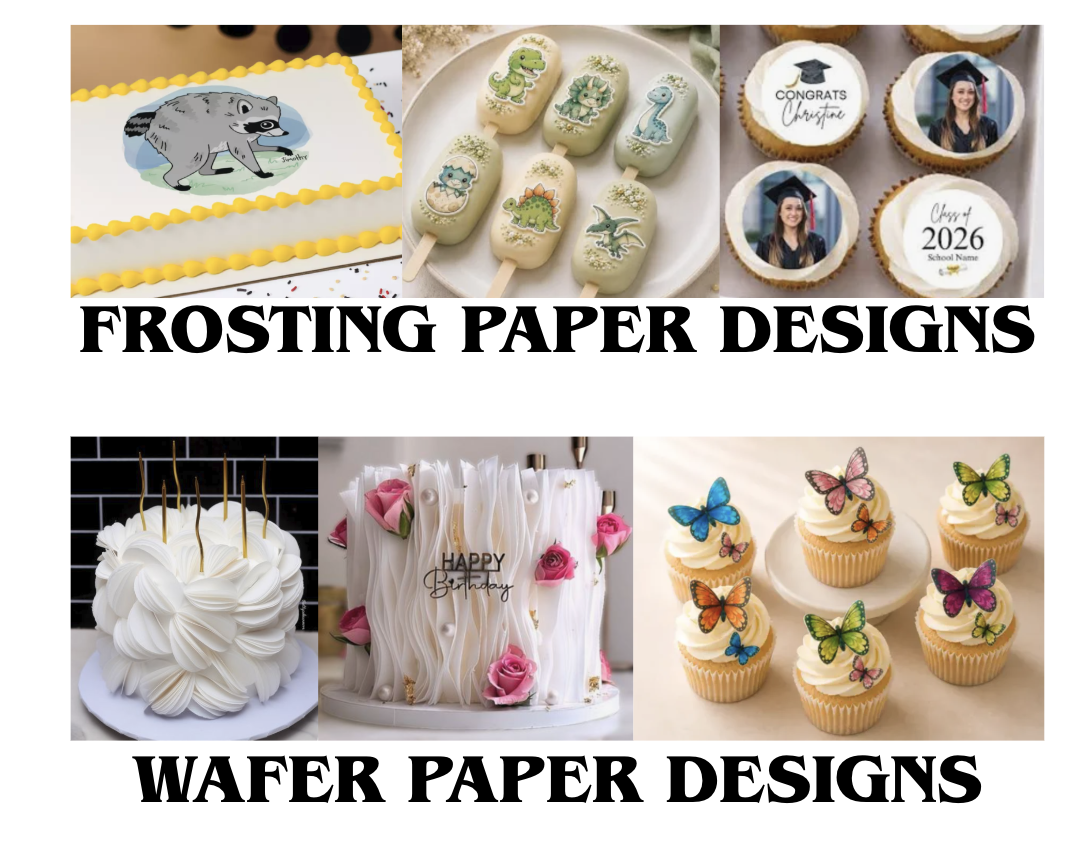
Frosting sheets are typically used for images that will be flat on the cake top or sides. These can be used for cupcakes, cookies, cake pops, or other treats.
Wafer paper sheets are typically used for anything that needs to stand up or be dimensional, like book pages or butterfly wings.
Preparing Your Images
Frosting sheets are approximately 8″ x 10″. The largest that we can print is about 7.5″x9.5″ as the printer needs a big margin.
If image(s) on single sheet are smaller than 7.5”x9.5” printing size, you can easily cut them to size with any sharp scissors or a kitchen knife.
Ideally you will send and image file (rather than a document or PDF file) so that we can easily resize the image to print properly. We can provide some sizing support, but we are not able to provide design services.
Provide a 300 DPI resolution. Images printed out at 72 DPI will have some loss of detail but generally still work fine.
How to Submit
Email the image(s) as an attachment to images@homecakedecorating.com. If the file is embedded in the email, we usually can not get it at its original size or it may be distorted.
One day notice is needed for images. Images received by 5pm are printed by the business day after we receive them, usually by 10 AM.
Cupcake sizes can be printed with or without a guide line (let us know what you prefer). You’ll need to cut out the shapes with scissors or a craft punch.
Pricing
Frosting Sheets — $13.95 per sheet
Burn Cake (includes both a Frosting sheet for the bottom layer and a Wafer sheet for the top burn layer) — $26.95
Wafer Paper Sheets — $12.95 per sheet
Helpful Suggestions
Applying Frosting Sheets
Do not apply any decorations before applying the image.
Frosting should be buttercream or common store-bought ready-to-spread frostings.
For best results, use a white frosting where the images are to be placed.
Frosting or icing should not be dry or have a skin.
Remove the edible image from bag and leave out in normal room conditions for about 15 minutes.
The edible image will peel away easily from backing paper. If any difficulty removing, pull backing sheet over the sharp edge of a table, etc., and the icing sheet should come away from backing sheet. If it is stuck to the clear backing, use a hair dryer and carefully blow hot air on the backing of the image until it starts to loosen (drying the moisture that is causing the sheet to stick to the backing).
Lay the printed sheet on top of your cake by holding ends and applying middle first and then lowering towards the ends. If any wrinkles appear, gently pat image to smooth them out.
Add border or edging of your choice to your cake.
You can write on top of the image with frostings or jellies as needed just before serving.
Burn Sheet Sets
Frost cake as usual.
Place the Frosting sheet directly on the cake and pipe a border to cover the edges.
Build up that same border 1 layer in height.
Gently place the Wafer sheet (burn layer) on the frosting border and lightly press the edges onto the frosting (leaving a small gap between the two sheet layers).
Pipe final frosting edge layer.
Be sure to keep the sheet free from moisture to prevent warping or melting.
Hints
Images should not be refrigerated until applied to the cake.
Various frostings can be used, however, a very wet Whipped Cream or Non-Dairy Topping can cause the image to fade if left in the refrigerator for a long period of time.
If cakes are frozen, it is best to thaw slightly before applying the Icing Image. Watch for and remove moisture bubbles before applying the image.
The icing sheet will have either no taste or a slight vanilla flavor. It is safe to eat directly off the backing and does not require being placed on a cake.
It is ok to cut the image or images out with scissors or a sharp blade with the backing still on if the entire sheet is not needed.
Do not leave in direct sunlight. Keep stored in the sealed bag face down and protected from damage until ready to apply.
What can be printed?
Your personal photographs
Anything you’ve created yourself (drawings, photos, collages, etc.)
Designs purchased from an online seller who has provided permission for files to be printed.
We cannot print copyrighted material, although we can help to create a similar vibe with colors or designs that align with the theme.
Customer-Provided Designs & Copyright
By submitting a file for printing, you confirm that you own the rights to the design or have permission from the copyright holder to reproduce it. We do not review or verify ownership of submitted content and are not responsible for unauthorized use of copyrighted, trademarked, or licensed materials.
We reserve the right to refuse any print job that appears to violate intellectual property rights or applicable laws.